OpenAI’s New ‘Intelligent UI’ Turns ChatGPT Responses Into Interactive Visual Tools
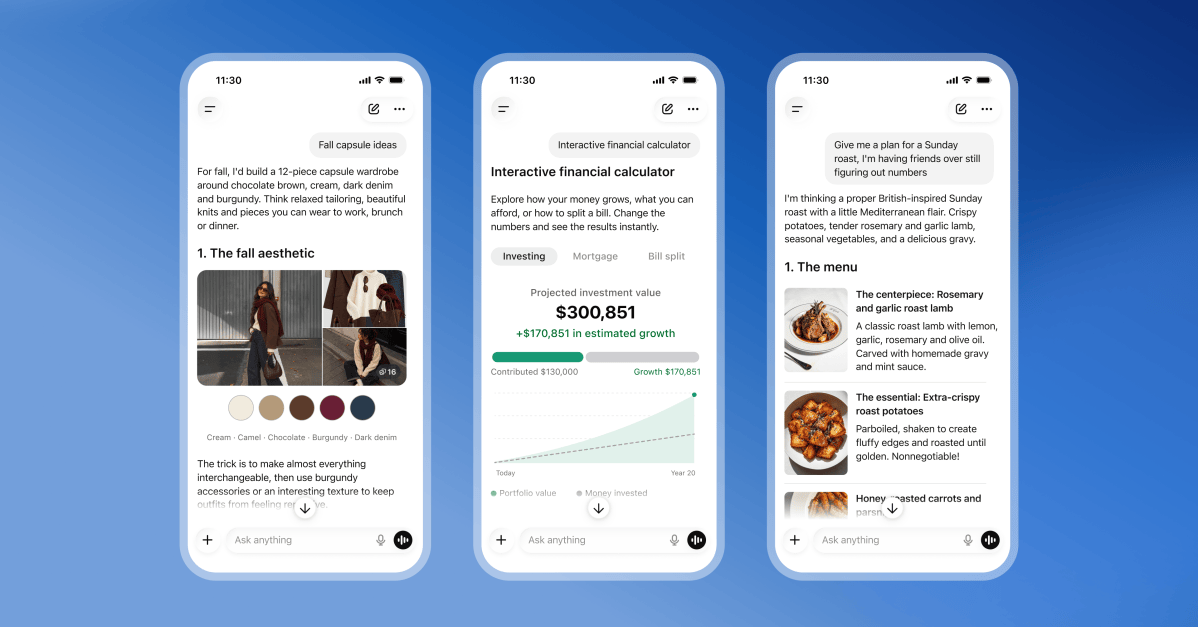
OpenAI is rolling out a major new ChatGPT feature called Intelligent UI, a system designed to move beyond plain text answers and give users interactive visuals such as diagrams, charts, forms, and tappable buttons. The update is arriving alongside the company’s next-generation GPT-6 model family, and it is being made available to users across multiple subscription tiers.
The announcement represents a notable shift in how OpenAI envisions conversation with an AI assistant. Instead of only replying with paragraphs of text, ChatGPT will now be able to combine written explanations with visual components that users can click, explore, and manipulate. According to OpenAI, this makes answers more useful for complex topics, hands-on learning, and practical tasks.
What Is Intelligent UI?
Intelligent UI is OpenAI’s term for a new capability that lets ChatGPT generate interactive elements directly inside a response. The feature is designed to be used when a visual explanation is more helpful than a text-only answer. For example, if a user asks how a particular machine works, ChatGPT might generate an annotated diagram with clickable parts. If a user asks for help organizing information, the chatbot could create a sortable chart or an interactive form.
OpenAI says GPT-6 has been specifically trained to determine when to produce these interactive visuals and how to format them in a response. That means the model is not simply attaching images or static graphics. It is building functional UI components that are integrated into the conversation, allowing the user to engage with the content in real time.
The company shared several examples to illustrate the feature’s potential. One demonstration shows ChatGPT explaining the design of a seven-speed bicycle. Instead of a long block of text describing the frame, gears, brakes, and chain, ChatGPT generates a diagram of the bicycle with interactive buttons that highlight different parts when clicked. This allows the user to learn about each component visually, at their own pace.
Another example focuses on the game of Mahjong. ChatGPT can teach a user how to play by generating visuals of each tile and sorting them into categories that can be scrolled through. This makes it easier to understand the different suits, honor tiles, and bonus tiles without having to read through dense explanations.
Generating Tools On Demand
Beyond educational visuals, Intelligent UI can also produce fully functional tools directly within the chat window. Users can ask ChatGPT to create a retirement savings calculator, a retro-style game, or a bill splitter, and the chatbot will generate the tool inline with its response.
This moves ChatGPT closer to being a general-purpose productivity assistant capable of creating small applications on the fly. Rather than sending a user to a separate website or asking them to download a file, ChatGPT can simply build the tool and present it in the conversation. The result is a more seamless experience where users can go from asking a question to using a customized utility in a matter of seconds.
The retirement savings calculator example is particularly interesting. A user could type a question about how much they need to save each month to reach a certain retirement goal. ChatGPT would not only give a general answer but also generate an interactive calculator with fields for current savings, monthly contributions, expected return rate, and retirement age. The user could then adjust the numbers and immediately see how the estimated total changes.
Similarly, a request for a bill splitter could produce a simple form where users enter the total amount, the number of people splitting the bill, and any tip percentage. ChatGPT would then calculate each person’s share and display the result interactively. For a retro game request, ChatGPT might generate a playable mini-game embedded in the chat, complete with controls for starting and resetting the game.
GPT-6: The Model Behind the Feature
Intelligent UI is powered by GPT-6, OpenAI’s newest AI model family. The first GPT-6 models were announced last month, but this week’s update brings two specific variants to ChatGPT: GPT-6 Sol and GPT-6 Luna.
Sol is described as a mid-range model that balances capability and efficiency. It is being made available to higher-tier subscribers, including ChatGPT Plus, Pro, Business, and Enterprise users. Luna, meanwhile, is positioned as the more efficient model in the family. It is optimized for faster performance and lower resource usage, making it suitable for the free and Go tiers.
This tier-based approach means that different users will get different versions of GPT-6. Higher-tier subscribers will gain access to Sol, which is likely to offer deeper reasoning and more advanced interactive capabilities. Go and free users will use Luna, which is designed to handle everyday tasks efficiently while still supporting Intelligent UI.
Improved Search and Faster Partial Answers
In addition to enabling Intelligent UI, GPT-6 brings improvements to how ChatGPT handles search and information gathering. OpenAI says the new model performs better web searches, meaning it can find relevant, up-to-date information more effectively. This is an important upgrade for users who rely on ChatGPT as a research tool or a quick source of current events.
The model is also capable of providing quicker, partial answers while it continues to gather information. Instead of waiting for the AI to complete a full web search before responding, users may see a useful initial answer appear almost immediately. This can make conversations feel more responsive, especially when the AI needs to pull data from multiple sources.
OpenAI also highlighted that GPT-6 showed stronger resistance to attempts to bypass its safety training. Safety and alignment have been ongoing concerns in the AI industry, and OpenAI has faced scrutiny over the years regarding jailbreak attempts and unintended behavior. The company states that GPT-6 has improved safeguards, making it harder for malicious users to trick the model into producing harmful or policy-violating content.
Rollout to Users
The rollout of GPT-6 with Intelligent UI begins today for ChatGPT Plus, Pro, Business, and Enterprise subscribers. These users will get immediate access to the new feature and the Sol model. OpenAI says the rollout is global, meaning users in many regions will see the update on the same day.
For Go and free-tier users, the expansion will come on Thursday. At that point, they will be able to use Intelligent UI powered by the Luna model. The two-day gap suggests OpenAI is staging the rollout to manage server load and ensure stability across its infrastructure.
This staggered rollout is not unusual for OpenAI. Large model updates are often introduced gradually to high-tier customers before reaching the wider user base. It also gives the company time to monitor the new feature in production and address any issues before expanding access.
What This Means for ChatGPT Users
The introduction of Intelligent UI signals that OpenAI is looking to make ChatGPT a more complete platform for interactive problem-solving. For years, the core experience of ChatGPT was conversational: a user asks a question, and the AI responds with text. While that approach is powerful, it has limitations. Some types of information are better communicated visually, and some tasks require tools, not just explanations.
By integrating interactive visuals and generated applications, ChatGPT can now handle those situations more naturally. The feature could be especially useful in education, where visual diagrams and interactive examples help students grasp difficult concepts. It could also be valuable in business settings, where calculators, forms, and data visualizations are part of everyday work.
Developers and tech enthusiasts are likely to experiment with the new capabilities as well. The idea of asking an AI to build a small game or a custom calculator inside a chat window opens up creative possibilities. It also demonstrates how far AI-assisted interfaces have come in a relatively short time.
A Growing Trend in AI Assistants
OpenAI is not the only company exploring interactive responses. Other AI companies have experimented with graphical interfaces, live charts, and embedded applications in their assistants. However, OpenAI’s move to make Intelligent UI a core part of ChatGPT, bundled with a major model release, suggests that interactive responses are becoming a standard expectation rather than a novelty.
The combination of improved search, faster partial answers, stronger safety, and interactive output could make GPT-6 one of the more significant updates to ChatGPT in recent memory. It also reflects a broader shift in the AI industry toward assistants that do not just talk but act, creating useful tools and visualizations on demand.
As with any new AI feature, there will likely be questions about reliability and limits. Will interactive visuals always be accurate? Can generated tools handle complex, real-world scenarios? OpenAI has not provided detailed answers to those questions yet, but the company will likely refine the feature over time based on user feedback.
For now, users on paid tiers can begin exploring Intelligent UI today, while Go and free users will get their turn later this week. Whether it is a bicycle diagram, a Mahjong lesson, or a custom retirement calculator, ChatGPT is clearly moving toward a more visual and interactive future.