Amazon’s Alexa Tablet 12 Pro Is All About the Screen — and That’s Mostly a Good Thing
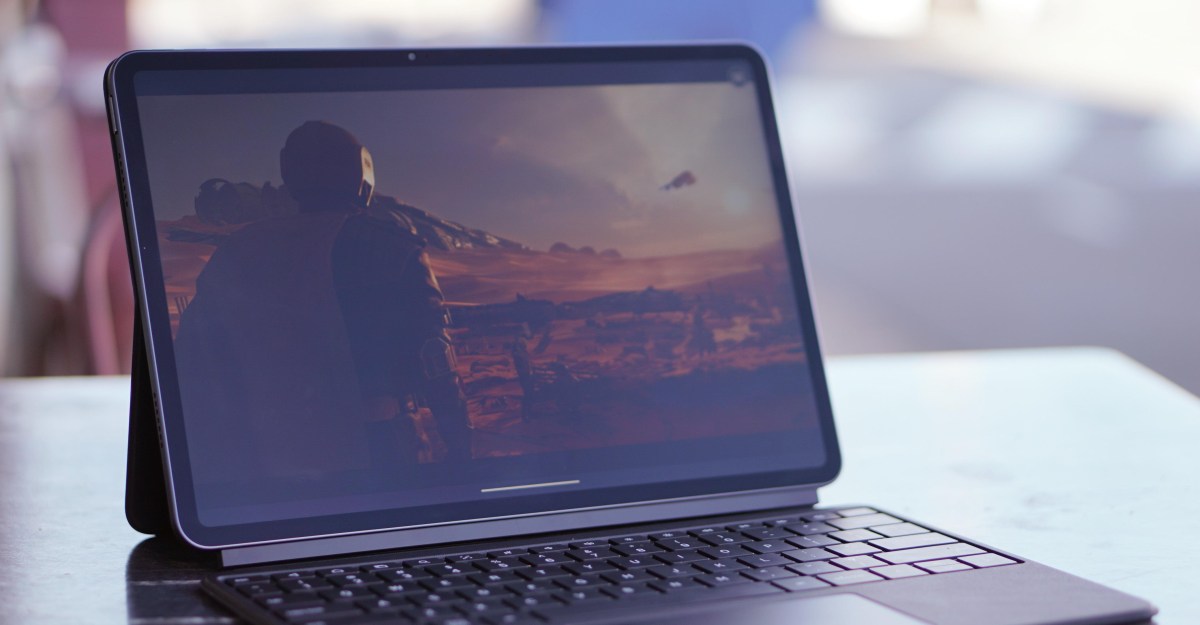
It’s impossible to talk about the Alexa Tablet 12 Pro without starting with the display. The screen is the first thing you see when you pick up the device, and for most people, it will be the single most important reason to buy it. Amazon’s newest flagship tablet features a 12-inch, 2800 x 1840 panel with a coating the company calls “Nanomatte,” a matte finish designed to cut down on glare while making on-screen images feel almost tangible. When Amazon set out to build the best tablet it has ever shipped, this is where the company started — and it shows.
The 12 Pro I’ve been testing costs $549.99. It’s part of a four-model lineup that starts at $229.99 for an 8-inch version and tops out at $679.99 for a 12 Pro with the Nanomatte finish and extra RAM that most people won’t need. The pitch across all four devices is straightforward: these are well-built, midrange tablets that run the full Android ecosystem, including access to the Google Play Store. That alone makes them a big step up from Amazon’s older Fire tablets. I haven’t spent time with the cheaper models, but I’m glad they exist. The world needs more affordable Android tablets that don’t feel like junk, and Amazon appears to be taking that idea seriously.
Back to the Nanomatte, though, because it deserves the attention. Amazon says it worked with Corning to etch the glass at a sub-pixel level, which reduces reflections without producing the rainbow shimmer you sometimes see on other matte displays. It works. When I use an iPad outdoors, the screen often becomes a mirror, reflecting whatever is behind me. The Alexa Tablet 12 Pro, by contrast, only picks up a faint sheen of light, and it manages that while keeping text and images remarkably sharp. The viewing angles are also excellent. I wish the panel could get a little brighter, but the whole point of brightness is usually to overcome glare, and glare just isn’t much of a problem here.
The screen isn’t perfect, though. The anti-glare texture introduces a slight sparkle, especially when you’re looking at white text on a black background. The blacks aren’t as deep as an iPad’s OLED panel either. When watching a movie on the Alexa Tablet, the letterbox bars above and below the picture remain faintly lit, whereas an iPad’s OLED display turns those areas completely off. Some of these issues can be addressed in the settings. The 12 Pro includes display modes that automatically adjust tone and color for reading, plus presets that work like a TV’s picture modes. My review unit arrived with “Boosted” mode enabled, which made colors look overly saturated. I switched it to “Natural” and immediately preferred the result.
This isn’t exactly a revolution in display technology, but it is a genuinely impressive screen. I said “whoa” out loud the first time I turned it on, and at that moment all that was on the display was the Amazon logo. The 120Hz refresh rate makes everything feel smooth, whether you’re scrolling through articles or playing Star Wars: Galactic Racer. The 3:2 aspect ratio is also great for web browsing and side-by-side productivity. The more muted display settings make reading more comfortable than it is on most giant screens, though it’s a bit disappointing that those settings only work inside the Kindle app. After a few days of using the tablet both indoors and outside, I found myself preferring the 12 Pro’s screen to any iPad I’ve used. I didn’t have an iPad Pro with nano-texture glass to compare it to, but that tablet costs around $2,200, so it’s probably not a real competition for most buyers.
As good as the display is, Amazon had to make compromises elsewhere to hit that $549.99 price. The MediaTek Dimensity 8400 processor is capable, but it’s not going to set any speed records. In benchmarks, it lands somewhere between a flagship Android phone from last year and one from two years ago. It gets completely crushed by just about every current iPad. In one graphics-heavy test, the newest 13-inch iPad Pro scored roughly nine times higher. That sounds alarming, but in day-to-day use, the 12 Pro feels plenty fast. I spent days playing games, working through documents, and watching NFL RedZone, and the only real sluggishness I noticed was in the Android interface itself. The app switcher sometimes stutters when it opens. I do worry a little about how this tablet will age, because it doesn’t have the iPad’s massive surplus of processing power. For now, though, it’s fine.
In fact, “fine” is a good way to describe most of the 12 Pro’s hardware. The four speakers are a bit thin and muddy, but they get loud enough and remain clear for casual listening. The cameras wash out colors, but they’re perfectly acceptable for video calls. The optional $149.99 keyboard case is comfortable to type on, but it’s awkward to detach and adjust. The $89.99 stylus is smooth and responsive, but Android apps still don’t offer very good stylus support. Battery life came in at around eight hours of screen time for me, which is a little less than I’d like and less than Amazon advertises. None of these things are deal-breakers. They’re just a collection of compromises, and together they make the tablet feel like a well-rounded midrange device rather than a true flagship killer.
The software story is where things get more complicated. The great news is that the Alexa Tablets run full Android, not the strange, isolated operating system Amazon has used on Fire tablets for the past 15 years. That means you get access to the entire Google Play Store, a much better interface, and even Google’s Gemini assistant. This change alone makes the Alexa Tablets the most functional Amazon tablets ever released.
The bad news is that Amazon has done exactly what you’d expect: it buried Android under a pile of Amazon services. I can accept the slide-over panel on the left side of the home screen that shows recommendations. People who buy Alexa Tablets probably overlap heavily with Prime subscribers and Kindle users, and that screen isn’t constantly in your face. I can even tolerate Amazon preloading its own browser, photos, and music apps, even though none of them are better than the competition. What I can’t tolerate is the two non-removable home-screen widgets that serve no purpose other than advertising Amazon products. If you’re going to claim that you “obsess over customers,” you probably shouldn’t take over the top left corner of the home screen to show an ad that vaguely suggests you “Cook with premium ingredients.” That ad also launches an Alexa chat window in the bottom right corner, and you can’t hide that either.
Fortunately, this is Android, so the fix is easy. Installing a different launcher takes about 30 seconds, and I recommend doing that immediately if you buy this tablet. Once you do, you’re left with a solid Android device that doesn’t constantly nag you about Amazon’s ecosystem.
Alexa herself is another reason to consider swapping assistants. A year after launch, Alexa Plus still isn’t very useful as a general-purpose assistant. It’s slow, it loses track of complex conversations, and it doesn’t have enough access to your apps and data to be genuinely helpful. Where it does excel is shopping. If you’re looking at a product on screen, you can invoke Alexa and it will almost always assume you want to buy whatever you’re looking at. For anything else, you’ll probably be disappointed. The good news is that you can switch to Gemini in the settings, and you should.
Once you de-Amazon the tablet, you’re left with a surprisingly useful Android device. That makes the Alexa Tablet both easy and difficult to recommend. I wouldn’t suggest using it as a primary computer. Large-screen Android apps are still a work in progress, and the ecosystem hasn’t caught up to the iPad’s polished tablet apps. Between this device and Google’s ongoing struggles with big-screen software, it’s clear that Google needs to do more to convince developers to care about tablets and keyboards.
But as a tablet for tablet things — reading, streaming, browsing, watching sports, playing games — this is one of the best options you can buy. The Kindle-specific display mode is lovely, the Play Store gives you access to every streaming and reading app you could want, and that screen is an absolute joy to use.
Realistically, most people will be choosing between the Alexa Tablet 12 Pro and an iPad. For the same $550 you’d spend on the 12 Pro, you can buy a base-model iPad with 256GB of storage. I’d probably tell most people to buy the iPad. It has much better tablet software, better big-screen apps, and a much better track record when it comes to updates and long-term support. The iPad is the safer choice.
And yet, for the last few days, I’ve had both an iPad and an Alexa Tablet sitting on my desk. Every time I wanted to watch a show or read something, I reached for Amazon’s tablet. It’s just really nice to look at. The screen makes everything look better, and the matte finish makes it feel more like paper and less like a glowing mirror. That experience is hard to quantify, but it’s real. If your main priority is a gorgeous display for reading and watching media, the Alexa Tablet 12 Pro deserves a serious look. It’s not the most powerful tablet, and its software needs a little cleanup, but the hardware quality is undeniable. Amazon finally made a tablet that competes on its own terms — and for the first time in a long time, that feels like an exciting thing.